Authentication: Architecture and Security – MicroTube Part I

Software developer with 4+ years of experience in various areas. Mainly Unity and .NET.
Recently I finished the MVP of one of my big projects - MicroTube (aka mini Youtube). The project turned out to be quite complex, with many parts such as authentication, video processing, search, reactions, comments, etc. So I thought it would be interesting to share my experience of developing such a product and to highlight each of its features.
This article is the first in a series in which I will explain the development process of a complete project step by step. The series will largely focus on the architecture and decision-making side of the development, rather than the code, although the actual code is available on my github.
Authentication
Authentication is the foundation of all web services and must be a top priority in terms of security, feature completeness, and UX. It is one of the first systems a user interacts with when they accessing the platform. Such a system must be able to securely store and manage user credentials on demand.
The most common solution is to simply outsource your authentication to a third-party OAuth 2.0 provider, such as Firebase or OAuth0.
This approach has the following advantages:
Highly secure with a lot of staff working to ensure it.
Lots of out-of-the-box features such as UI, database, credential management.
Most the popular Social Login providers are available by default.
But also several disadvantages:
Can be quite expensive.
Migrating to another provider is not a trivial task if you already have real customers.
Each provider must be configured manually, and misconfiguration can easily lead to data leaks.
I wanted my application to be as independent as possible, so I decided to build my own authentication system. It was written from scratch using the project’s basic stack of .NET and EF Core. The main goal was to make it compliant with modern security standards and convenient for the users to interact with.
Basic Flow
I call the good old credential/password authentication type Basic Flow for convenience. I disagree with the statement that it is becoming obsolete and we should all switch to so-called ‘Social Login’ providers like Google, Facebook, etc. Sure, they are convenient one-click login solutions, but at the same time we entrust our access management to a single company and the moment something goes wrong with that company, or we lose access to our Google or Facebook account, we end up losing access to all the resources we were registered with.
So it was decided to use Basic Flow as the default authentication type for MicroTube. However, the system must be extensible, so that additional social login providers could easily be added in the future.
Registration
The first step is to register the user in the system. For this we require a username and an email, each of which can be used in combination with a password to log in later. These credentials are first validated on the frontend to ensure the correct length and type. The same validation is performed on the backend, with an additional uniqueness check to prevent duplicate usernames or emails.
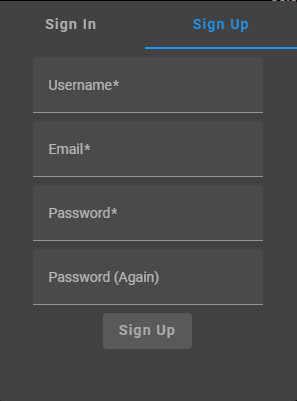
The second credential is always the password. It has additional security requirements such as character length and mandatory numbers.
According to security standards, a password must be encrypted with a strong hashing algorithm, that supports an additional random salt. The password must never be stored in plain text. This ensures that even if the database is compromised, an attacker can't get the actual password. The random salt, in turn, ensures that an attacker can't establish a relationship between multiple encrypted passwords, reducing the risk of discovering of a well-known password and adding a large time complexity to any reverse hashing attempts.
For MicroTube, a random salt is generated as an array of secure random bytes, and then the password is hashed with it using the PBKDF2 algorithm. Finally, the salt is prepended to the encrypted password and both are stored in the database as a single Base64 string.

At the very end of the registration process, we also need to send a confirmation email to the address provided in order to verify the ownership. The process is the same as the email change, described later in the article.
Login
Whenever user wants to log in, they send their email/username + password. The password is then encrypted as described above and the resulting hash is compared to the one in the database. If they match, the user is considered to be logged in.
Users can log into their MicroTube account immediately after the registration. Each such manual login creates a Session and returns two tokens: an access token and a refresh token. More about Sessions and refresh mechanisms later in the article.
The access token represents a JSON Web Token (JWT) that is built and signed by the application with a special key. The signature does not encrypt the data inside, but ensures that any attempt to modify the content will result in a validation failure and access denial during the signature check. The access token lets the server know that whoever sent it is a fully privileged user and is allowed to access the API.
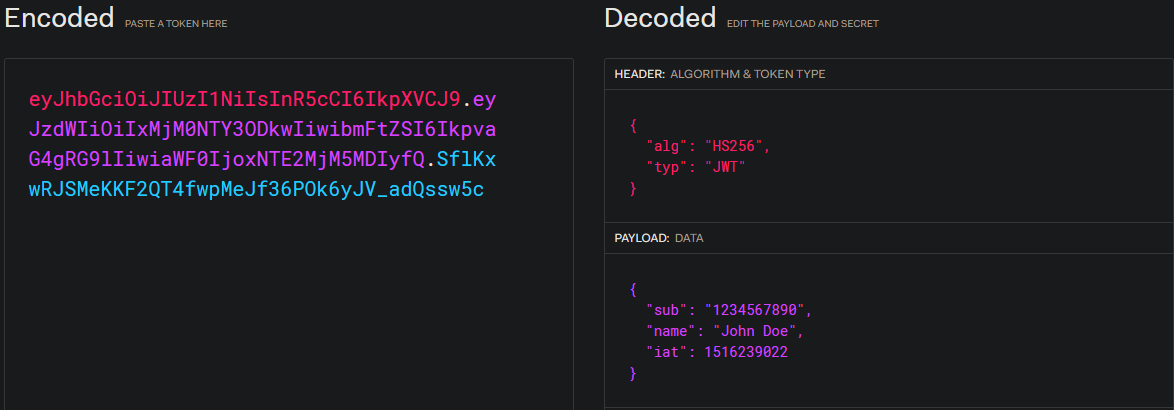
An example of JWT (source: jwt.io)
JWT tokens can also store any data within them in json format. This data is called claims and can help reducing database calls and simplify the implementation of an authorization mechanism. For example, MicroTube uses the IsEmailConfirmed claim in order to restrict user access to certain actions. This claim is read from the token itself, not the database, and is automatically trusted, because JWT tokens cannot be tampered with.
Credentials Management
Basic Flow authentication system must be able to provide users with the ability to securely manage their credentials. Users can often forget their password or lose access to their email, therefore these features are essential. MicroTube provides both password reset and email change flows.

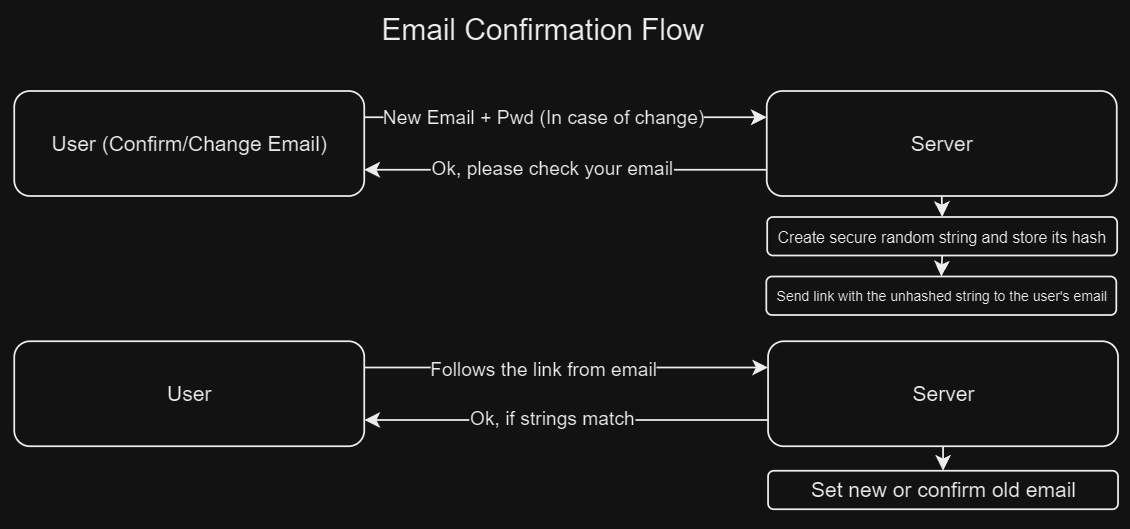
Email confirmation and email change use the same mechanism and the change cannot be started until the very first email is confirmed.
First, a long (64+) byte array is securely generated and converted to base64 or hex string. The resulting string must never be stored in plain text for the same reasons as the password. Therefore, we make a hash of it with SHA256 and store only the hash along with the expiration time.
Then a special link is sent to the email with the unhashed raw string attached. When the user follows the link, the raw string is sent back to the server where it is hashed again and compared to the value in the database. If two values match and the string has not yet expired, the email is considered confirmed. Similar to how we validate the password.
Changing email requires the user to enter their password as an additional security check. A potential new email is also saved and, in case of success, the old one is replaced by the new one. Then the confirmation process is started for the new email in the same way as described above.
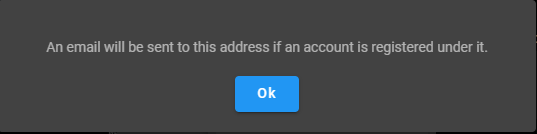
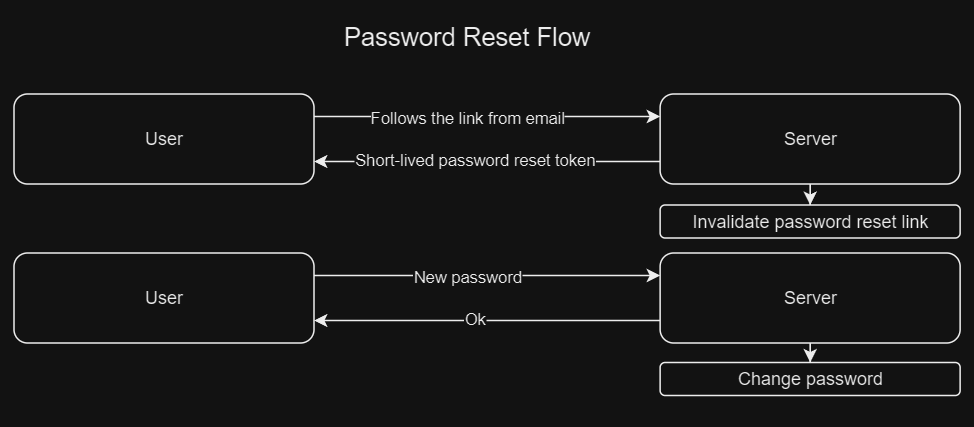
It is common for users to forget their password, so the standard “Forgot your Password?“ button must always be present on the login screen. When pressed, the user is prompted to enter their email. If it is found in the database, a similarly generated random string is sent to it. Note, that regardless of whether the email was found or not, the response to this action must be ambiguous, so that a potential attacker can’t know whether a user with such an email is actually registered in the system.
Password reset, however, is a bit more complicated, and requires additional security measures to prevent abuse of a reset link. The process starts in the same way as the email change, but when the user follows the link, instead of changing the password immediately, they receive a temporary, short-lived (~5 min) JWT access token with a special password reset claim. The goal here is to invalidate the reset string after the first use and to limit the reset window to a short period of time in order to prevent potential access token leaks. Once the user has successfully changed the password they can use it to log in.
Sessions
Access tokens are relatively short-lived (~60 min). Once they expire, they can no longer be used to access the resources. While this mitigates the risks of potential access token leaks, it would force the user to manually re-login after each expiration.
Refresh tokens have been introduced to address this issue and find a middle ground between security and user experience. They are secure random strings that typically contain no business data and cannot be used to access the API, but can be exchanged for an actual access token. These tokens have a long lifetime, from weeks to several months, depending on how security-critical your application is.
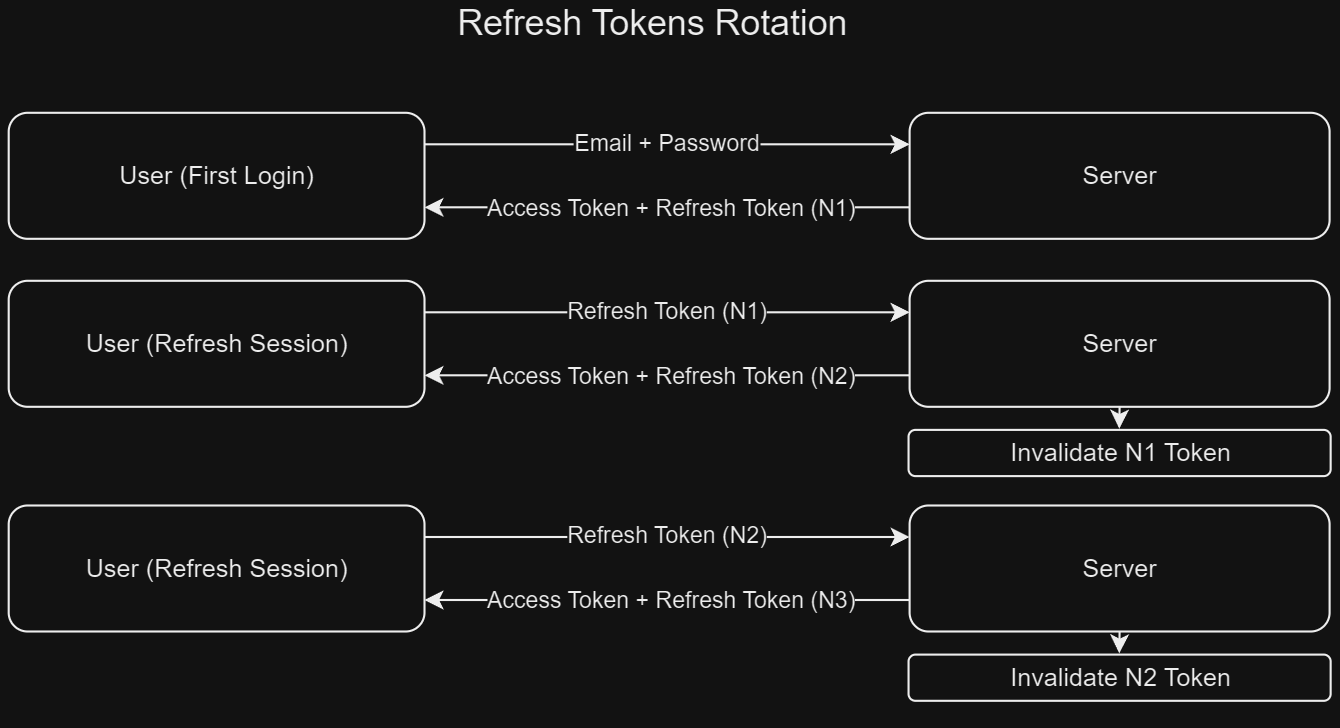
However, the creation of many long-lived, reusable refresh tokens is a big security concern. We need another mechanism on top of them to mitigate it. MicroTube uses Refresh Tokens Rotation and Reuse Prevention in order to greatly reduce the number of active tokens and even have the ability to invalidate them.
When the user logs in manually, the first refresh token is generated for them and a new Session is created and stored in the database. Each time the user wants to exchange their refresh token for an access token, they get a new refresh token as well, with the current refresh token being immediately invalidated. This ensures that we have only one active refresh token at a time for that session, and, usually, per device, reducing the risk of token leaks.
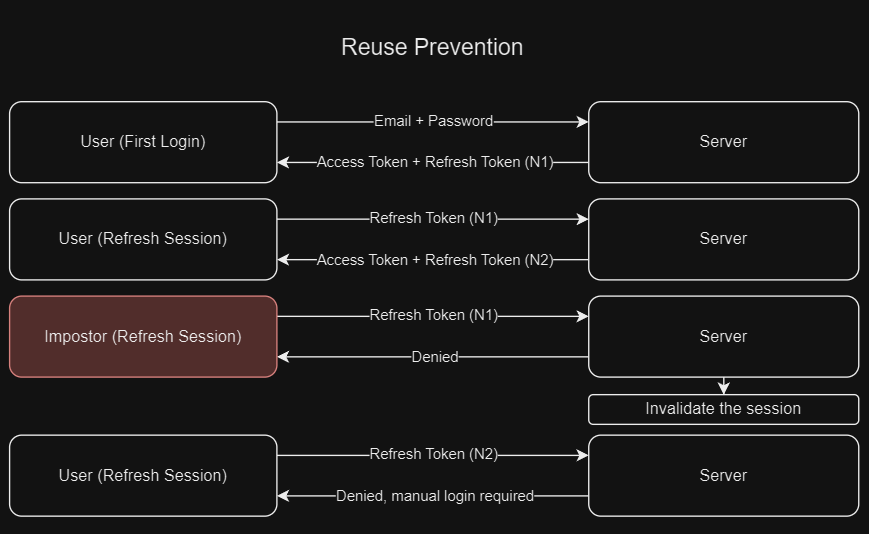
MicroTube, however, goes beyond that and, additionally to the refresh tokens, implements the reuse prevention logic. All the refresh tokens ever generated for a user session are stored in the database and, if there is an attempt to use the same token twice, the system will consider it a hacking attempt and invalidate the entire session, forcing the actual user to log in manually again.
A Session can also contain various analytics data such as IP, time and device name. This data can be used, for example, to notify the user of a suspicious activity or for data analysis.
Conclusion
Creating a secure authentication is not a trivial task these days, with new vulnerabilities discovered every year. An authentication system must be reviewed regularly and updated to the latest standards. Developing such a system is also about finding the right balance between user experience and security, as the two do not co-exist well within an application.
Thank you for reading! This is my first article, so constructive criticism is very welcome in the comments. If you are interested in the MicroTube project, want to see the code, or even contribute, check out the project repository.